Rendered page images include a selectable, searchable layer for document text. Text inside images is not recognized; links are not clickable.
One unencrypted DOCX · 20 MB · Up to 50 pages. Headers, footers and footnotes are not exported. Review limits.
PDF page preview
In your browserNo uploadsNo account
How to convert DOCX to PDF
Choose your document
Select or drop one .docx file. Leave the document layout defaults or open Page settings.
Convert and review
Press Convert to PDF, then inspect the generated page images and any reported limits.
Save the result
Use Download PDF and open it to check the pages. Changing settings removes the previous download until you convert again.
If you change DOCX to PDF again after editing settings, review the new output before sharing it.
Page layout and table continuation
Browser layout and fonts
Use this DOCX to PDF converter online for a local, visual export. Fonts available on your device and browser layout can change wrapping. This is not Microsoft Word's layout engine. Compare every page with your source before sharing it.
Paper, orientation and margins
Choose the document's page dimensions or A4/Letter, orientation and margins.
Table rows and repeating headers
A table is moved to the next page one row at a time. When the option is enabled, consecutive header rows marked as repeating headers in the DOCX are copied onto continuation pages. An unmarked first row is not guessed to be a header.
Support and limits
Use one unencrypted DOCX containing paragraphs, headings, lists, ordinary tables and embedded images.
A row taller than the printable page, a table needing a break through vertically merged cells, or another single oversized block stops the conversion with an explanation. No partial PDF is offered as a complete conversion. Wide tables may require landscape or narrower margins.
File and output boundaries
Legacy .doc, encrypted files and PDF inputs are not supported. Maximum input size is 20 MB, expanded archive size 80 MB and output 50 pages. These are limits enforced by this tool, not measured accuracy claims. Large documents may still exceed your device's memory.
Complex floating shapes, charts, equations, columns, document fields, comments and tracked changes are not a reliable match to Word. Original page headers, footers and footnotes are not exported in this version. Embedded body images are supported; external images are blocked. PDF pages retain rendered images and add a positioned text layer for supported document characters.
English and Chinese have been checked with our fixtures; this is not a claim that every language or character works. Characters the text font cannot encode (including emoji outside the BMP) stop export with an explanation. Text inside images and generated list markers are not part of that text layer. There is no clickable link export, PDF/A or accessibility-tagging guarantee. Use Word or LibreOffice export when those are requirements.
Test files and results
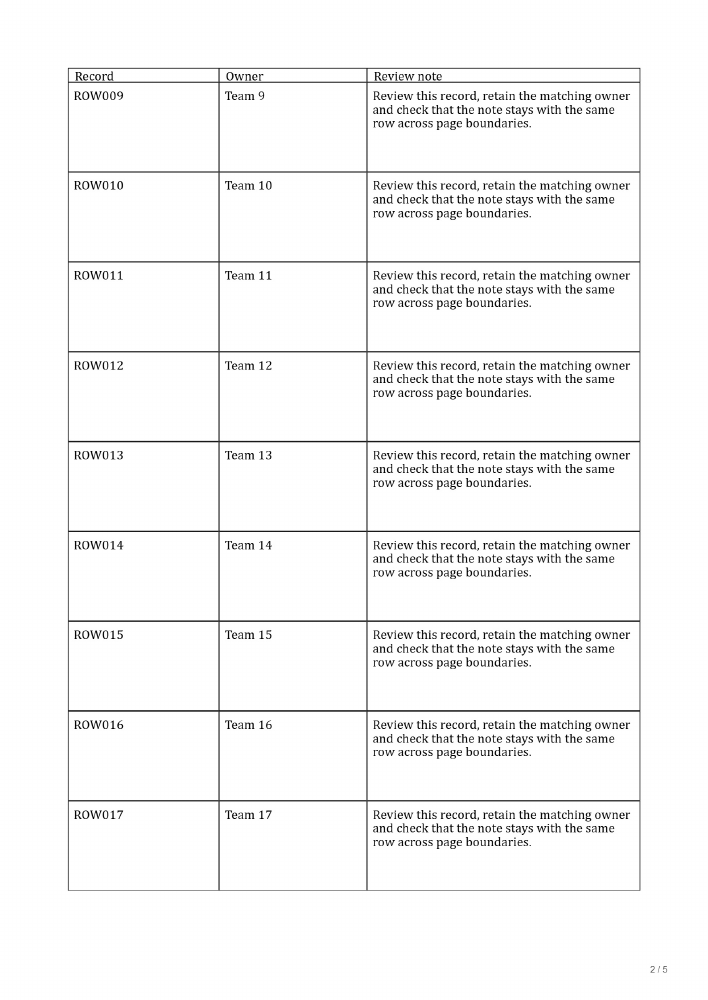
We created an English DOCX with 40 uniquely numbered records (ROW001–ROW040), three columns, a marked repeating header and a minimum row height of 1.05 inches. Source page: A4, portrait, 20 mm margins. Converter settings: Document size, Document orientation, Document margins, High image quality; Repeat marked headers enabled.
The actual downloaded PDF had five pages. We checked all 40 identifiers in the paginated document and visually inspected every rendered PDF page. No numbered row was missing in this fixture. In the searchable export, all 40 identifiers were also extracted from the downloaded PDF exactly once, with a header on each page. This does not establish accuracy for other documents or validate all cell contents automatically.
PDF page
Identifiers checked
Data rows
Header present
1
ROW001–ROW008
8
Yes
2
ROW009–ROW017
9
Yes
3
ROW018–ROW026
9
Yes
4
ROW027–ROW035
9
Yes
5
ROW036–ROW040
5
Yes
With header repetition switched off, the same sample still produced five pages and contained all 40 identifiers, but pages 2–5 had no repeated header in the paginated document. Automatic repetition applies to marked DOCX header rows; it is not a guarantee for every table.
File reading, rendering and PDF generation run in this browser. Your selected document is not sent to a conversion service. Conversion components load from this site, and external document images are blocked.
Separate website-delivery, analytics and advertisement requests are described in our privacy policy. The affiliate banner at the end of this page loads from CJ; your document is not sent with it.
Frequently asked questions
Can I select and search text in the PDF?
Yes, supported document text has a positioned, invisible text layer over the page image. Open the downloaded PDF in a PDF reader to select, copy or search it. This does not turn text in embedded images into searchable text; no OCR is performed. Copying a table may still need spacing cleanup.
Does the preview show the exported pages?
The preview uses the same rendered page images included in the PDF. Open the downloaded PDF too, especially to check page count, small text and table continuation.
Will the PDF look exactly like Word?
Not necessarily. Browser fonts and layout differ from Word, and complex document elements have limits described above. Review your actual output; we do not promise perfect fidelity.